Replace Material
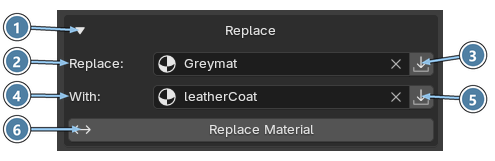
The Replace section swaps one material for another on every object that uses it. It is below the Textures section. See the Interface Overview.
- Section header. Click to expand or collapse the Replace section.
- Replace. The material you want to replace. Click the field to choose it from the list. The × button clears the field.
- Use Selected Material. Puts the material selected in Material Manager into the Replace field.
- With. The material to use instead.
- Use Selected Material. Puts the material selected in Material Manager into the With field.
- Replace Material. Runs the replacement.
Where the replacement happens
- Objects are selected: only the selected objects are changed.
- Nothing is selected: the whole scene is searched.
Example
- Select
Old_Metalin the material list and click the button next to Replace. - Select
Steel Brushedand click the button next to With. - Click Replace Material.
Every object that used Old_Metal now uses Steel Brushed.