Interface Overview
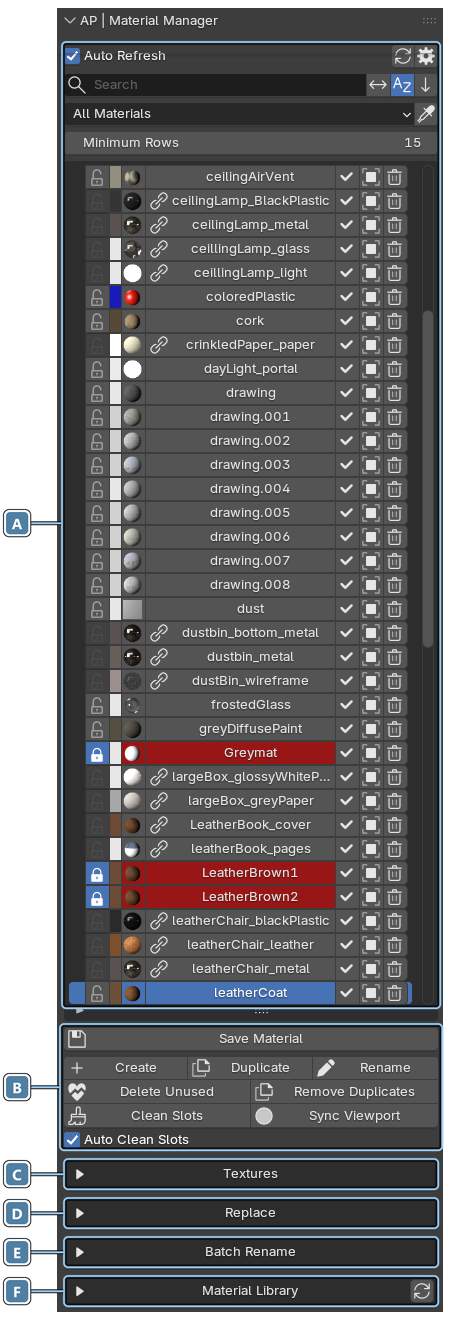
The Material Manager panel is split into sections. The sections below the material list can be expanded or collapsed by clicking their headers.
- Material list. Every material of the blend file with markers, swatches, search, filters and sorting. See Material List.
- Material actions. Save, create, duplicate and rename materials, plus the cleanup buttons. See Material List and Cleanup Tools.
- Textures. All images used by the file. See Textures.
- Replace. Swap one material for another. See Replace Material.
- Batch Rename. Rename many materials at once. See Batch Rename.
- Material Library. Your saved material presets. See Material Library.
Material Asset Browser
One more section, Material Asset Browser, appears under the Material Library when you turn it on in the Preferences.
Tip
Hover over any button to see a tooltip that explains what it does.