AP | Material Manager

Browse, assign, replace, clean up, and reuse materials in Blender.
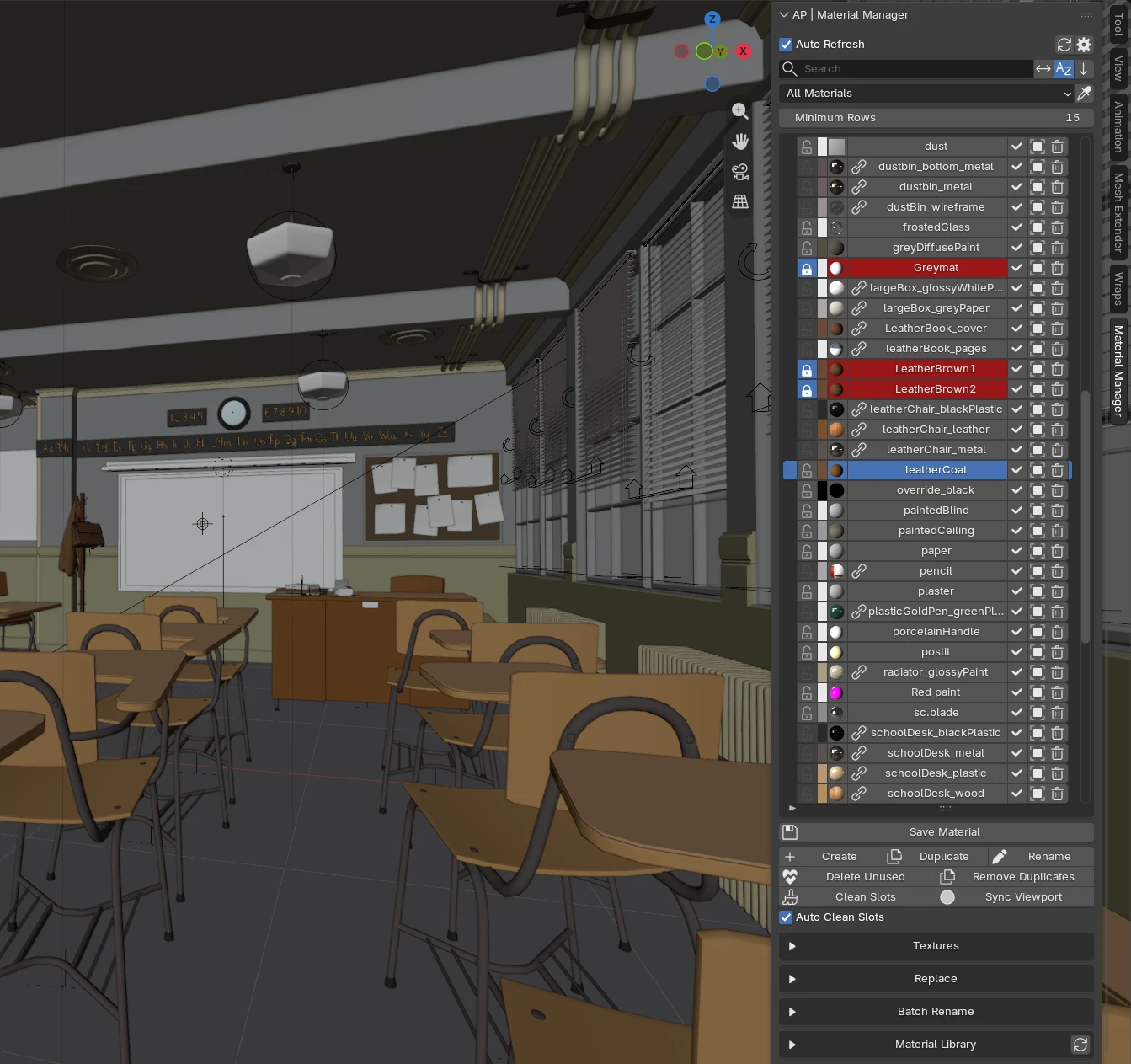
AP | Material Manager puts every material of your blend file into one panel in the 3D View sidebar. You can see which materials are used, assign them to objects or faces, select every object or face that uses a material, replace one material with another, remove unused and duplicate materials, keep your favorite materials in a personal library, and manage textures. All of this happens in one panel, so you don't have to jump between the Material Properties, the Outliner and the File menu.
Features
- Material list with live markers for materials used by the selected objects, preview swatches, filters and sorting.
- Assign materials to objects, or to faces in Edit Mode.
- Select by material: select all objects or all faces that use a material.
- Pick Material straight from the 3D View with the eyedropper.
- Cleanup tools: delete unused materials, remove duplicates, clean empty material slots.
- Replace Material across the whole scene or only on selected objects.
- Batch Rename with prefix, suffix and find and replace.
- Material Library: save your own materials as presets and reuse them in any project.
- Material Asset Browser: assign or link materials from your Blender Asset Libraries.
- Textures: find missing files, reload, relink, pack and unpack, see where each texture is used.
Quick links
Requirements
- Blender 4.5 or newer.