Batch Rename
Batch Rename changes the names of many materials at once. The Batch Rename section is below the Replace section. See the Interface Overview.
It works on the editable materials that are visible in the current list, so use the name filter and filter mode first to choose which materials to rename.
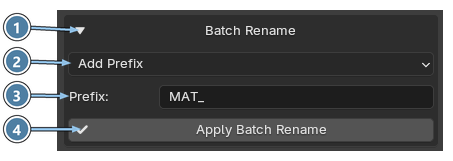
- Section header. Click to expand or collapse the Batch Rename section.
- Operation. Choose what to do with the names. See the table below.
- Text. The text to add. Its label is Prefix or Suffix. With Replace Text there are two fields instead: Find for the text to search for and Replace for the new text.
- Apply Batch Rename. Renames the materials.
| Operation | Result |
|---|---|
| Add Prefix | Adds text to the beginning of each name. |
| Add Suffix | Adds text to the end of each name. |
| Replace Text | Replaces matching text in each name. |
Note
Linked and read-only materials are skipped. Name conflicts are resolved automatically.