Installation
AP | Material Manager is a Blender extension. It needs Blender 4.5 or newer.
Install from a .zip file
- Download the
.zipfile of the extension. Do not unpack it. - In Blender, open Edit › Preferences and go to the Add-ons tab.
- Open the drop-down menu in the top right corner and choose Install from Disk....
- Select the downloaded
.zipfile and click Install from Disk. - Make sure the checkbox next to AP | Material Manager is on.
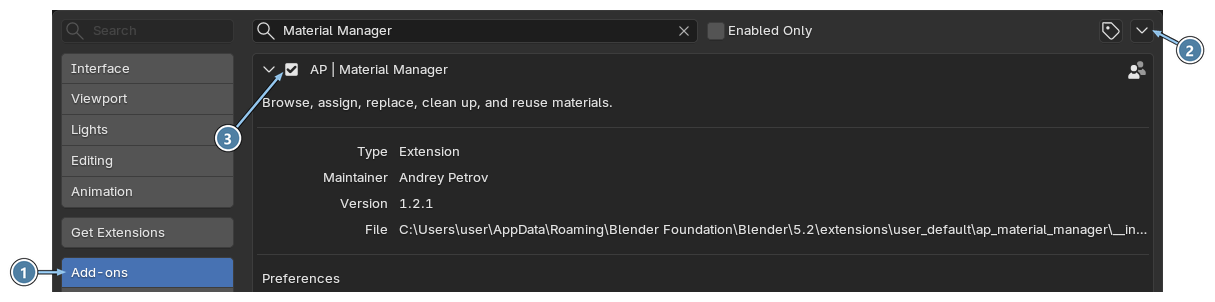
- Add-ons tab.
- Drop-down menu with Install from Disk....
- Enable checkbox of AP | Material Manager.
Tip
You can also drag the .zip file from your file explorer and drop it onto the Blender window.
Update to a new version
Install the new .zip file the same way. Blender replaces the old version. Your Material Library and preferences are kept.
Uninstall
- Open Edit › Preferences and go to the Get Extensions tab.
- Find AP | Material Manager in the Installed list.
- Open the drop-down menu at the right end of its row and choose Uninstall.
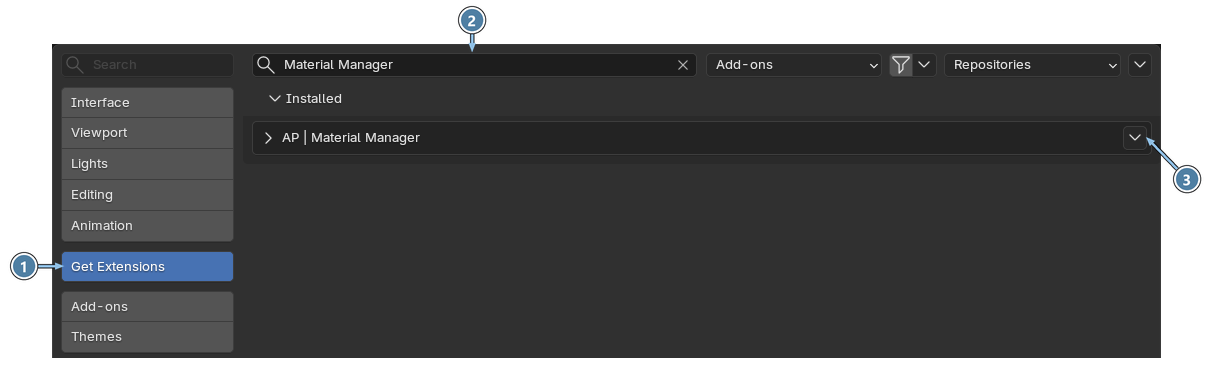
- Get Extensions tab.
- Search field. Type the name to find the extension quickly.
- Drop-down menu with Uninstall.
Your Material Library
If your library is in the default folder, Blender deletes it together with the add-on. To keep your presets, copy the library folder somewhere safe before you uninstall. See Library folder.